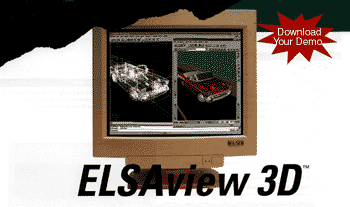
Pure 3D Viewing Power for AutoCAD
-
Real time 100% GLoria OpenGL Hardware Acceleration
-
FullFeatured 3D Lights, Transparency, & Named Views
- Eport Designs for Colllaboration & Web Publishing
- Intergrated with AutoCAD, Mechanical Desktop, & Architectual Desktop
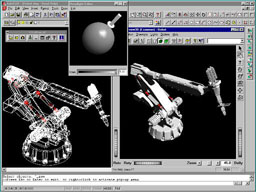
- Light source and material editor
- Bi-directional light and material support with AutoCAD
- Clipping planes for cross-sectional views of the model
- Navigational improvements for model walkthroughs and fly-throughs
- Support for Magellan 3D devices

Stand-Alone features for CAD and visualization
- Productivity gains through real-time visualization of the 3D model
- Light sources can be created and freely positioned
- Import and export of VRML 1.0 and Open Inventor file formats for universal use
- 3D models can be displayed on any computer - even without the CAD program. Benefits: you can present your texture 3D model to a customer, use the Web, or simply send your designs via E-mail. With ELSAview 3D, your ideas come to life - anywhere, anytime.
AutoCAD-related features
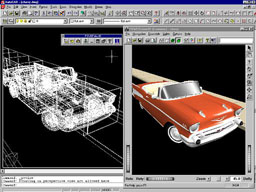
- ELSAview 3D fully integrates itself into AutoCAD Release 13 and 14 as well as Autodesk Mechanical Desktop.
- The independent ELSAview 3D windows can be freely positioned on the desktop - ideal for multi-screen operation or 16:10 wide-screen monitors.
- ELSAview 3D views are dynamically updated while you edit your model in AutoCAD.
- 3D panning, zooming and rotation in ELSAview 3D is possible without AutoCAD regeneration.
- Light sources and views defined in AutoCAD are taken over by ELSAview 3D.
- Switching between perspective and orthogonal projection is possible with one mouse click and without regeneration.
- AutoCAD models can be saved and exported in VRML and Open Inventor formats.
Enhanced real-time 3D visualization of CAD models
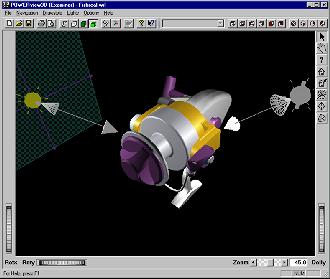
Completing its high performance solution for CAD users, ELSA is offering users of GLoria graphics boards a unique application for real-time rendering of 3D objects. Integrated with AutoCAD® and Autodesk Mechanical Desktop®, or functional as a stand alone application, ELSAview 3D features a wide range of functions, an intuitive user interface, and unsurpassed rendering performance. ELSAview 3D allows CAD users to experience 3D modeling seamlessly, while offering interoperability and extensive functionality.
ELSAview 3D offers complete flexibility to the user, and can be used with numerous CAD and animation applications. VRML and Open Inventor file support allows 3D models to be rendered and viewed outside the original CAD environment. For users of AutoCAD or Autodesk Mechanical Desktop, ELSAview 3D offers a completely integrated 3D interface. The CAD model in AutoCAD is displayed in real-time as a photo-realistic 3D model in the ELSAview 3D window. The application even enables printing of the 3D model, or its publication as a bitmap or VRML file onto the Internet or your workflow group.
Designed with the end user in mind, ELSAview 3D allows you to adjust the perspective simply by dragging the mouse. The interface also allows the light sources to be defined, and the object colors to be modified. Other functions, include the ability to spin the object continuously on its axis, zoom-in, and simultaneous update between your ELSAview 3D view and AutoCAD viewport.
ELSAview 3D is the 3D viewer of choice for a wide range of CAD and visualization applications. It offers an alternative to the time consuming rendering procedure in AutoCAD by enabling the constant availability of a complete 3D model. For collaberative and publishing requirements, users can also publish their models to Open Inventor or VRML file format. Distinguished by its user friendly interface, it is a productivity tool like no other.
This software is only available for use with a GLoria graphics board. Part of the ELSA Software Advantage, ELSAview 3D with the GLoria accelerators provides an integrated solution for the professional CAD user. The solution relects ELSA's 12 years of experience developing high-end graphics products. The product is shipped at no extra cost with all new ELSA GLoria graphics boards, and can be downloaded from the ELSA web site by current GLoria users.
Complete Solution
- Full OpenGL® support with high 3D performance
- Multi-threading and multi-processor support - highest performance for high-end workstations
- Intuitive 3D user interface for easy of use
- Complete visualization capabilities with display modes such as wire frame, hidden lines, flat shading, Gouraud shading, and texture mapping
- Output to printer, bitmap and VRML files for collaborative and publishing requirements
ELSAview 3D: Free for all ELSA GLoria graphics boards
ELSAview 3D is
included as a standard accessory with all new ELSA GLoria graphics
boards. If you already own a GLoria board, you can download ELSAview
3D from the ELSA website for a complete CAD solution.
