ELSA Multi-Screen Functionality
Graphics solutions from ELSA are easily to use in professional multi-screen operation-through simple extensions to the graphics hardware

ELSA multi-screen solutions have a long heritage. The principle is tried and tested, and offers the user a high degree of investment security. Simply by combining identical ELSA GLoria or ELSA Synergy graphics boards (including the addition of further boards to an existing system) extends the standard workstation to a powerful dual- or multi-screen solution.
| Graphics solution | Operating system | Max. no. of monitors/graphics boards* |
| ELSA GLoria-L/MX | Windows NT® 3.51/4.0 | 2 |
| ELSA GLoria-XL | Windows NT® 3.51/4.0 | 2 |
| ELSA GLoria Synergy | Windows NT® 4.0
Windows® 95 Windows® 98 OS/2 Warp 4 |
6
6 6 2 |
The extended multi-screen functionality of the ELSA GLoria Synergy
The ELSA GLoria Synergy makes it possible, with the appropriate number of graphics boards, to operate a graphics system with up to six monitors. The multi-screen capabilities of the graphics drivers have been extended for this under Windows. The performance characteristics exceed by far the Windows standards.ELSA Settings enable customized multi-screen configurations
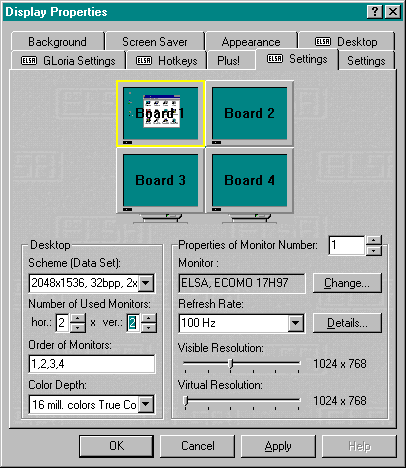 According to the field of application, the monitors can be freely positioned. This means that, in addition to the conventional horizontal arrangement, the drivers also support vertical arrangements and any rectangular formation. A further innovation concerns the setting of resolutions and refresh rates individually for each monitor. This provides the user advantageous ergonomics, in that each monitor can be used at the limits of the available performance. Together with the new implementation of the virtual screen, it is possible to use even differently sized monitors to form a graphics solution customized to the special needs of the user.
Specialized buttons for simple operation
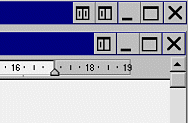
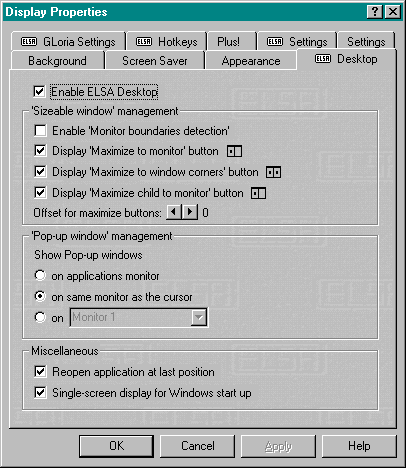 Handling multiple applications and their allocation to the monitors is very simple. Operation is highly intuitive with the added buttons which are automatically implemented in Windows programs. Under Display Properties, the ELSA Desktop register card serves for the allocation of functions simply and according to the demands of the user.
Freely-definable hotkeys boost productivity even more
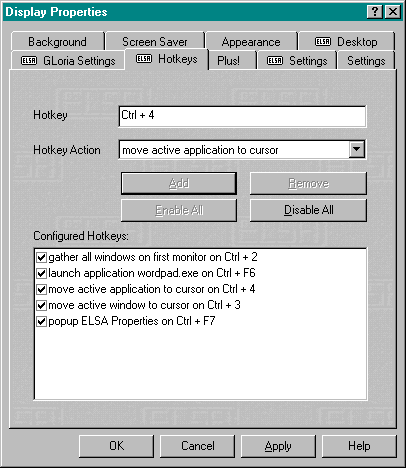 A further increase in productivity is offered by the special combinations of keys, called hotkeys, which can be freely defined by the user. As well as the practical functions for configuring the desktop, hotkeys can also be defined to start those programs most often required.
The ELSA multi-screen functionality of the ELSA GLoria Synergy at a glance:
- Supports up to six monitors
- Free arrangement of the monitors (vertically, horizontally, rectangularly)
- Intuitive operation of the program arrangement
- Increased productivity through freely definable hotkeys
- User-related storage of window positions and hotkeys
- Individual setting of resolution for each monitor
- Individual setting of the refresh rate for each monitor
- Virtual screen to compensate for different monitor sizes