ELSA MAXtreme™
Productivity enhancement for 3D Studio MAX/VIZ R2.x with ELSA GLoria and Synergy graphics boards
3D Studio MAX R2.x and 3D Studio VIZ R2.x are powerful applications for modeling, rendering, visualizing and animating 3D objects. The software package includes two standard graphics drivers to be used alternatively with differing performance characteristics-a HEIDI driver (software Z buffer/SZB), and an OpenGL® driver (for hardware acceleration).
ELSA is the only manufacturer of graphics boards to have developed an optimized solution to increase user productivity and fully exploit existing performance reserves: ELSA MAXtreme is a special driver for 3D Studio MAX/VIZ Version R2.x which makes the most of the special features of the ELSA GLoria and ELSA Synergy graphics boards. It offers many improvements over standard drivers and thus considerable increases in performance and productivity when used with these applications.
ELSA MAXtreme available for the GLoria-XXL, GLoria-XL, GLoria-L/MX, Gloria-L and Synergy products. ELSA MAXtreme gives users already working with ELSA GLoria products the impression that they have a new graphics accelerator. New users will understand why ELSA is a world leader in graphics solutions.
The advantage of HEIDI
The HEIDI driver is especially fast when just one new object is to be drawn into a given scene. During this procedure, practically all operations affecting graphic representation are carried out entirely in the computer's CPU and its main memory. Only the fully-processed data ready for display is sent to the graphics board. This means that this driver is suitable for use on fairly powerful computers equipped with a simple graphics board.
The advantage of OpenGL
The advantage of OpenGL®
When used in conjunction with 3D graphics boards such as ELSA GLoria or ELSA Synergy, OpenGL offers extremely fast, hardware-accelerated display of shaded and textured scenes. With the ELSA GLoria-XXL, the entire processing of the 3D geometry takes place within the graphics accelerator. Even the movement of individual objects within complex environments is extremely quick with ELSA graphics boards used in conjunction with the OpenGL driver. A special Kinetix function extension to the OpenGL driver is supported by ELSA's NT drivers. OpenGL hardware acceleration allows complete scenes and complex textures to be modeled and animated much more quickly than using the HEIDI software driver in 3D Studio.
The advantage of ELSA MAXtreme and ELSA graphics boards
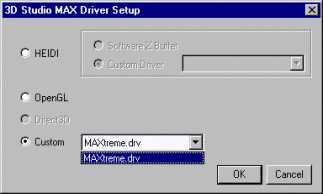 ELSA MAXtreme combines the advantages of HEIDI and OpenGL in a single driver-exclusively for ELSA GLoria and ELSA Synergy graphics accelerators. It represents an improvement and an extension to the Standard OpenGL driver. The carefully designed ELSA MAXtreme software has been specially developed to make full use of the specific performance characteristics of ELSA graphics boards. It also offers further improvements to the performance of ELSA accelerators when used with 3D Studio.
By developing a driver tailored to 3D Studio MAX and 3D Studio VIZ, ELSA's software developers have laid the foundation for further optimization and new functions which will be available only in ELSA GLoria graphics accelerators in the future.
By using ELSA MAXtreme, many effects which would otherwise not be visible until the final video-rendering stage can be displayed during the creative phase in "working view". These include:
 |
Transparency: Normally, transparent objects are displayed in 3D Studio MAX/VIZ by stippled "clouds" of varying densities ("stippled" or "screen door" process). This shows, to an extent, whether an object is transparent or not and how translucent it is. Even so, the visual impression it gives is not one of a transparent object. ELSA MAXtreme allows you to select
- Whether transparent objects are at all displayed in a transparent way (non-transparent display of transparent objects is, of course, particularly fast)
- Whether to use the standard method described above
- Whether transparent objects are actually displayed as transparent, i.e. by blending the transparent object's color with the color of the objects located behind them.
A further improvement is spatial sorting of transparent objects before they are displayed ("sorted blending") which gives a perfect impression of transparency even where there are any number of transparent objects in the scene.
|
|
Fog: Normally, no fogging is displayed in "working view" mode. However, MAXtreme also supports 3D Studio's standard fogging. This means that at an early stage one gets a realistic impression of a fogged scene. Animated too, of course.
Two more unique functions offered by the ELSA graphics solution using ELSA MAXtreme are stereo and render viewing modes:
|
|
Stereoscope Views: 3D Studio MAX/VIZ does not recognize any form of stereographic imaging. However, when a stereo-compatible board (GLoria-XL or -XXL) with shutter glasses is used, ELSA MAXtreme can display the images in stereo. Only ELSA offers this functionality. The benefits are obvious: the spatial impression makes the relative positioning of the objects easier to perceive, which increases work efficiency. And apart from all that, it looks really impressive!
|
|
Render Views: Normally, 3D Studio viewing modes "only" display an approximation of what will be seen using the production or draft renderer. Especially in cases where the user is using atmospheric effects or his own renderers, the result in the viewing modes may be poor. With MAXtremeRender, however, the current renderer is diverted directly to a view. This offers a simple, precise means of checking one's work.
|

3D Studio MAX R2: Benchmark 1 (Full Image).
These tests were made using a system running Intel Pentium® II (400 MHz) under Windows NT® 1024 x 768 x 32 bpp.
Which graphics board do I need?
Depending on the intended use and complexity of the task, GLoria graphics boards used with ELSA MAXtreme will suit your requirements:
| Requirement | Recommendation |
| Very complex scenes with small polygons, multiple light sources, materials and animations, stereoscopic views |
ELSA GLoria-XXL |
| Complex scenes with small polygons, materials and animations, stereoscopic views |
ELSA GLoria-XL |
| Models with a small number of polygons, materials with low resolutions, and animations |
ELSA GLoria Synergy |